• Spectro:o DMS
  • Spectro:o Digital Signage
  • Contact
  • English
    • Romanian
  • Spectro:o DMS
  • Spectro:o Digital Signage
  • Contact
  • English
    • Romanian

Spectro:o DMS

home/Documentație/Spectro:o DMS
Popular searchFirst Steps, How to access the Management Platform, General Information
Expand All Collapse All
  •  General Information
    • Player installation procedure
    • Player connection procedure to the network
    • System Overview
    • Acronyms and Abbreviations
    • Contact
  • HelpDesk Spectro:o
  •  Web Administration Platform
    • How to access the Management Platform
    • First Steps for a New User
    • Schedule
    • Players
    •   Player Groups
      • How to edit a Player Group?
      •   How to add a Player Group?
        • Types of Playlist
        • Fillers
      • How to automate your playlists with Spectro:o DMS?
    •   Content Management
      • Video files
      • Images
      • Fillers
      • Audio upload
      • Audio playlists
      • How to manage Paid Content?
    • Global Library
    • Users
    • Indoor Layouts
    • Sponsors
    • Centralizer
    • Last Displays
    • Content Overview
    • Players without Content
    • Audit
  • Verification process in case of malfunction
  • Verification Process in Case of Malfunction – SP 4G Module –

How to manage Paid Content?

Does somebody paid for his content to be shown on your displays? Here’s what you need to know: you must properly manage that paid account. Here’s how you can do that.

Before starting you need to ask a Spectro:o admin to activate the TPS playlist type. Then please make sure you manage paid content from the Master account level.

To manage paid content, follow these steps:

1. From the Master account, create a new group (eg: Campanie de la centru). It is activated from the details of the Playlist Type  group = Playlist TPS.

2. In order for the paid spots to reach the players to be displayed on the screens, the process involves mapping the basic groups of players with the central group (eg: Campanie de la centru) from which we want to send the paid spot to the players, as in the video below.

How to map a Group?

Take a look at this video to see how to map a Group:
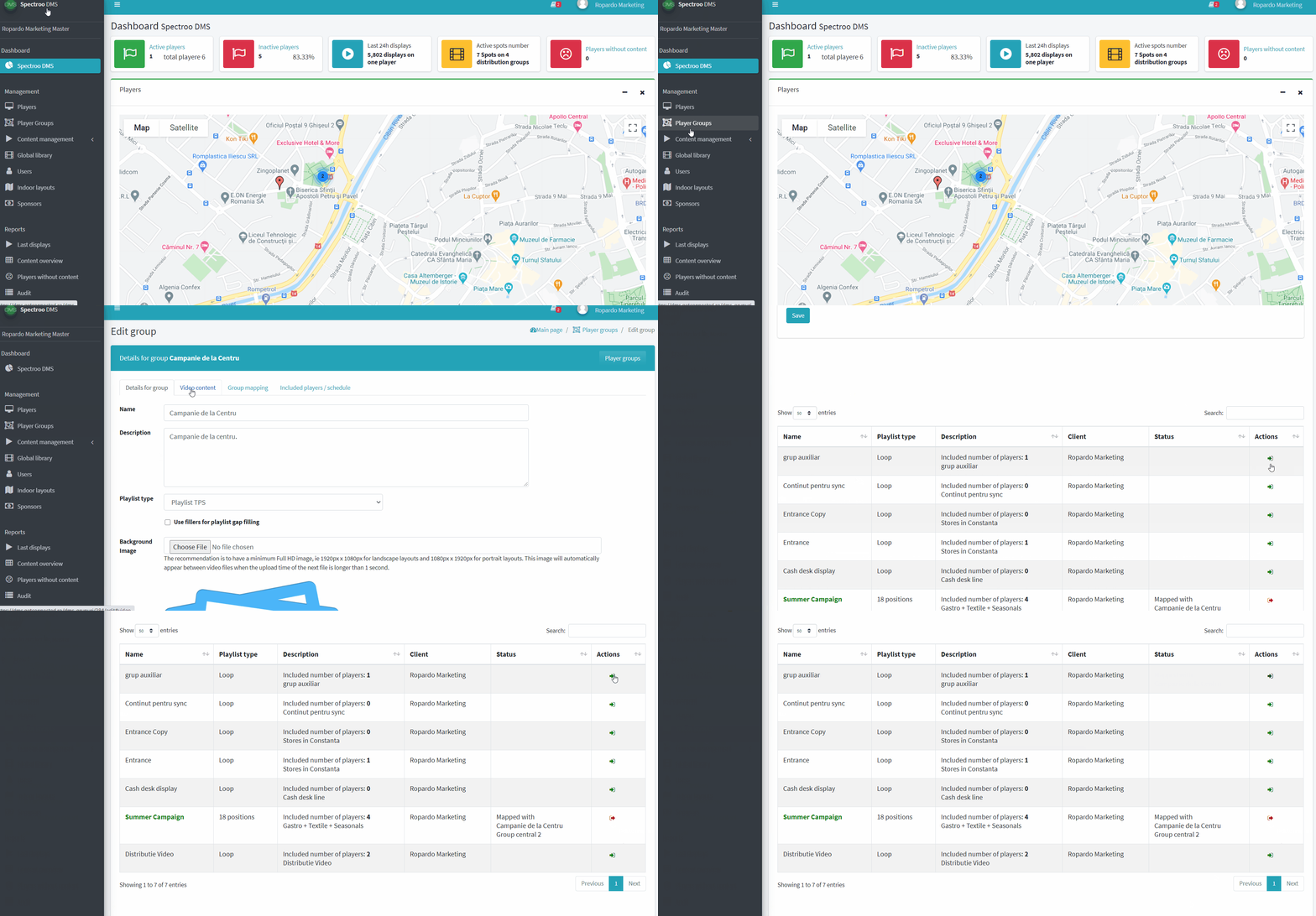
After mapping the groups, our spot inserted to video content on the central group (eg: Campaign from the center) is automatically transmitted to all mapped core groups, to all players in these groups in the playlists on the player.

3. Playlists on the player can be of two types, namely Loop or  18-positions Playlist.

3.1 For the situation in which a player has set on the basic group playlist type = Loop, the paid content will be displayed from the 50th second to the 60th second of every minute.

The playlist will now have in the playlist on the player the campaign or campaigns paid in the slots from the 50th second to the 60th second of every minute

The rest of the playlist (playlist that will run on the player) will be completed with content automatically taken from the following playlists (this is the designated order):

  • Playlist on the player
  • Playlist from the center group
  • Base group playlist
  • Playlist from an auxiliary group

3.2. When a player has set on the base group an 18-positions playlist type – the content is injected into the automatic playlist of 18 positions next to positions 6, 12 and 18 as in the image below.
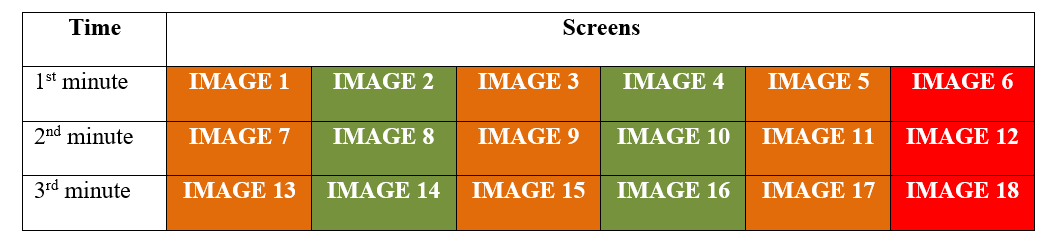
The playlist will now have in the playlist on the player the campaign or campaigns paid in slots 6, 12 and 18 (from the 50th to the 60th second of every minute).

The rest of the playlist (playlist that will run on the player) will be completed with content automatically taken from the following playlists (this is the designated order):

  • Playlist per player in slots 1/3/5/7/9/11/13/15/17.
  • Playlist from sync group or base group in slots 2/4/8/10/14/16.
  • Playlist from an auxiliary group in slots left unoccupied.
  • We automatically fill in the slots, but we prefer to explain them to you and configure the first campaigns together to offer an experience as we like to receive.

Recap: follow these 4 simple steps to manage your paid content:

  1. Create a Campaign Group (you can even name it like this Campaign Group). It means you need to add a new group from Master Account in the Player Groups section form the web administration platform.
  2. Map the groups from the Base Group where the player is active and where you want to display the paid campaign. This is called Group mapping (see the video from above).
  3. Add content (photo, video) in the Campaign Group created at step 1.
  4. Save.

Enjoy  😊

If you have question or need support please contact us.

Was this helpful?

Yes  No
Related Articles
  • Player installation procedure
  • Player connection procedure to the network
  • HelpDesk Spectro:o
  • General Information
About Spectro:o DMS
Spectro:o is an intuitive platform that helps you manage and distribute digital content on an endless number of screens.
Useful Links
  • General Information
  • Web Administration Platform
Contact Us
  • Reconstructiei, 2A 550129 Sibiu, Romania
  • dms [at] spectroo [dot] eu
  • Privacy Policy
  • © 2021 Spectro:o. All Rights Reserved.

Administrează consimțământul
Pentru a oferi cea mai bună experiență, folosim tehnologii, cum ar fi cookie-uri, pentru a stoca și/sau accesa informațiile despre dispozitive. Consimțământul pentru aceste tehnologii ne permite să procesăm date, cum ar fi comportamentul de navigare sau ID-uri unice pe acest site. Dacă nu îți dai consimțământul sau îți retragi consimțământul dat poate avea afecte negative asupra unor anumite funcționalități și funcții.
Funcționale Always active
Stocarea tehnică sau accesul este strict necesară în scopul legitim de a permite utilizarea unui anumit serviciu cerut în mod explicit de către un abonat sau un utilizator sau în scopul exclusiv de a executa transmiterea unei comunicări printr-o rețea de comunicații electronice.
Preferințe
Stocarea tehnică sau accesul este necesară în scop legitim pentru stocarea preferințelor care nu sunt cerute de abonat sau utilizator.
Statistici
Stocarea tehnică sau accesul care sunt utilizate exclusiv în scopuri statistice. Stocarea tehnică sau accesul care sunt utilizate exclusiv în scopuri statistice anonime. Fără o citație, conformitatea voluntară din partea Furnizorului tău de servicii de internet sau înregistrările suplimentare de la o terță parte, informațiile stocate sau preluate numai în acest scop nu pot fi utilizate de obicei pentru a te identifica.
Marketing
Stocarea tehnică sau accesul este necesară pentru a crea profiluri de utilizator la care trimitem publicitate sau pentru a urmări utilizatorul pe un site web sau pe mai multe site-uri web în scopuri de marketing similare.
  • Manage options
  • Manage services
  • Manage {vendor_count} vendors
  • Read more about these purposes
Vezi preferințele
  • {title}
  • {title}
  • {title}
Popular searchFirst Steps, How to access the Management Platform, General Information