• Spectro:o DMS
  • Spectro:o Digital Signage
  • Contact
  • English
    • Romanian
  • Spectro:o DMS
  • Spectro:o Digital Signage
  • Contact
  • English
    • Romanian

Spectro:o DMS

home/Documentație/Spectro:o DMS
Popular searchFirst Steps, How to access the Management Platform, General Information
Expand All Collapse All
  •  General Information
    • Player installation procedure
    • Player connection procedure to the network
    • System Overview
    • Acronyms and Abbreviations
    • Contact
  • HelpDesk Spectro:o
  •  Web Administration Platform
    • How to access the Management Platform
    • First Steps for a New User
    • Schedule
    • Players
    •   Player Groups
      • How to edit a Player Group?
      •   How to add a Player Group?
        • Types of Playlist
        • Fillers
      • How to automate your playlists with Spectro:o DMS?
    •   Content Management
      • Video files
      • Images
      • Fillers
      • Audio upload
      • Audio playlists
      • How to manage Paid Content?
    • Global Library
    • Users
    • Indoor Layouts
    • Sponsors
    • Centralizer
    • Last Displays
    • Content Overview
    • Players without Content
    • Audit
  • Verification process in case of malfunction
  • Verification Process in Case of Malfunction – SP 4G Module –

Players without Content

The Players without Content section is where you can check if you have connected players but with no content. All you have to do is select the interval. From the Interval filter you can choose a preset time frame  (today, yesterday, last 7 days, last 30 days, current month, last month) or a custom range.

After you have chosen interval from the filters, click on the Refresh button. That’s it!
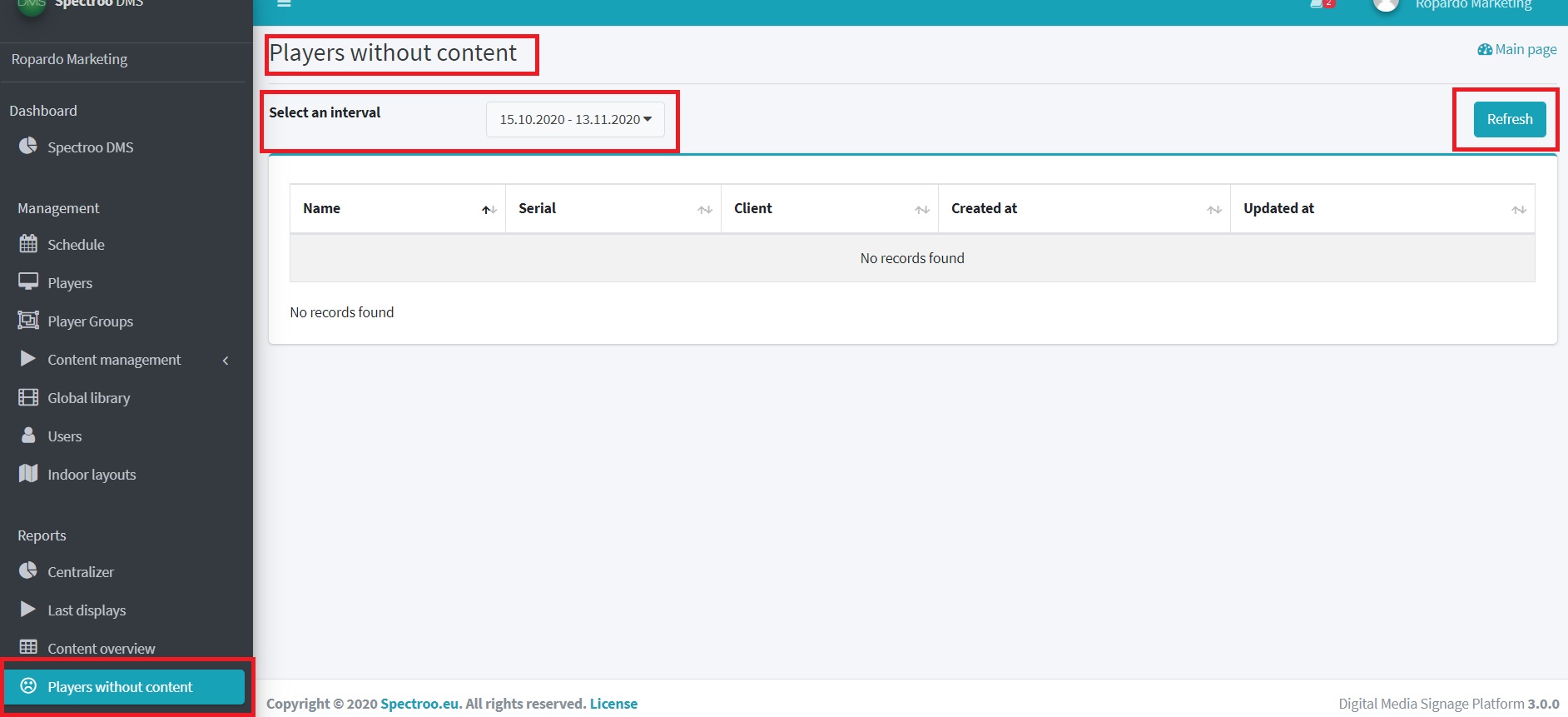
player without content

Was this helpful?

Yes  No
Related Articles
  • Player installation procedure
  • Player connection procedure to the network
  • HelpDesk Spectro:o
  • General Information
About Spectro:o DMS
Spectro:o is an intuitive platform that helps you manage and distribute digital content on an endless number of screens.
Useful Links
  • General Information
  • Web Administration Platform
Contact Us
  • Reconstructiei, 2A 550129 Sibiu, Romania
  • dms [at] spectroo [dot] eu
  • Privacy Policy
  • © 2021 Spectro:o. All Rights Reserved.

Administrează consimțământul
Pentru a oferi cea mai bună experiență, folosim tehnologii, cum ar fi cookie-uri, pentru a stoca și/sau accesa informațiile despre dispozitive. Consimțământul pentru aceste tehnologii ne permite să procesăm date, cum ar fi comportamentul de navigare sau ID-uri unice pe acest site. Dacă nu îți dai consimțământul sau îți retragi consimțământul dat poate avea afecte negative asupra unor anumite funcționalități și funcții.
Funcționale Always active
Stocarea tehnică sau accesul este strict necesară în scopul legitim de a permite utilizarea unui anumit serviciu cerut în mod explicit de către un abonat sau un utilizator sau în scopul exclusiv de a executa transmiterea unei comunicări printr-o rețea de comunicații electronice.
Preferințe
Stocarea tehnică sau accesul este necesară în scop legitim pentru stocarea preferințelor care nu sunt cerute de abonat sau utilizator.
Statistici
Stocarea tehnică sau accesul care sunt utilizate exclusiv în scopuri statistice. Stocarea tehnică sau accesul care sunt utilizate exclusiv în scopuri statistice anonime. Fără o citație, conformitatea voluntară din partea Furnizorului tău de servicii de internet sau înregistrările suplimentare de la o terță parte, informațiile stocate sau preluate numai în acest scop nu pot fi utilizate de obicei pentru a te identifica.
Marketing
Stocarea tehnică sau accesul este necesară pentru a crea profiluri de utilizator la care trimitem publicitate sau pentru a urmări utilizatorul pe un site web sau pe mai multe site-uri web în scopuri de marketing similare.
  • Manage options
  • Manage services
  • Manage {vendor_count} vendors
  • Read more about these purposes
Vezi preferințele
  • {title}
  • {title}
  • {title}
Popular searchFirst Steps, How to access the Management Platform, General Information